一直有想做属于自己的 App 的想法,零零散散地有学习一些内容,现在决定开启一个记录学习过程的系列博文,以此来巩固自己所学到的 iOS 开发知识和激励自己把第一个 App 实现出来。
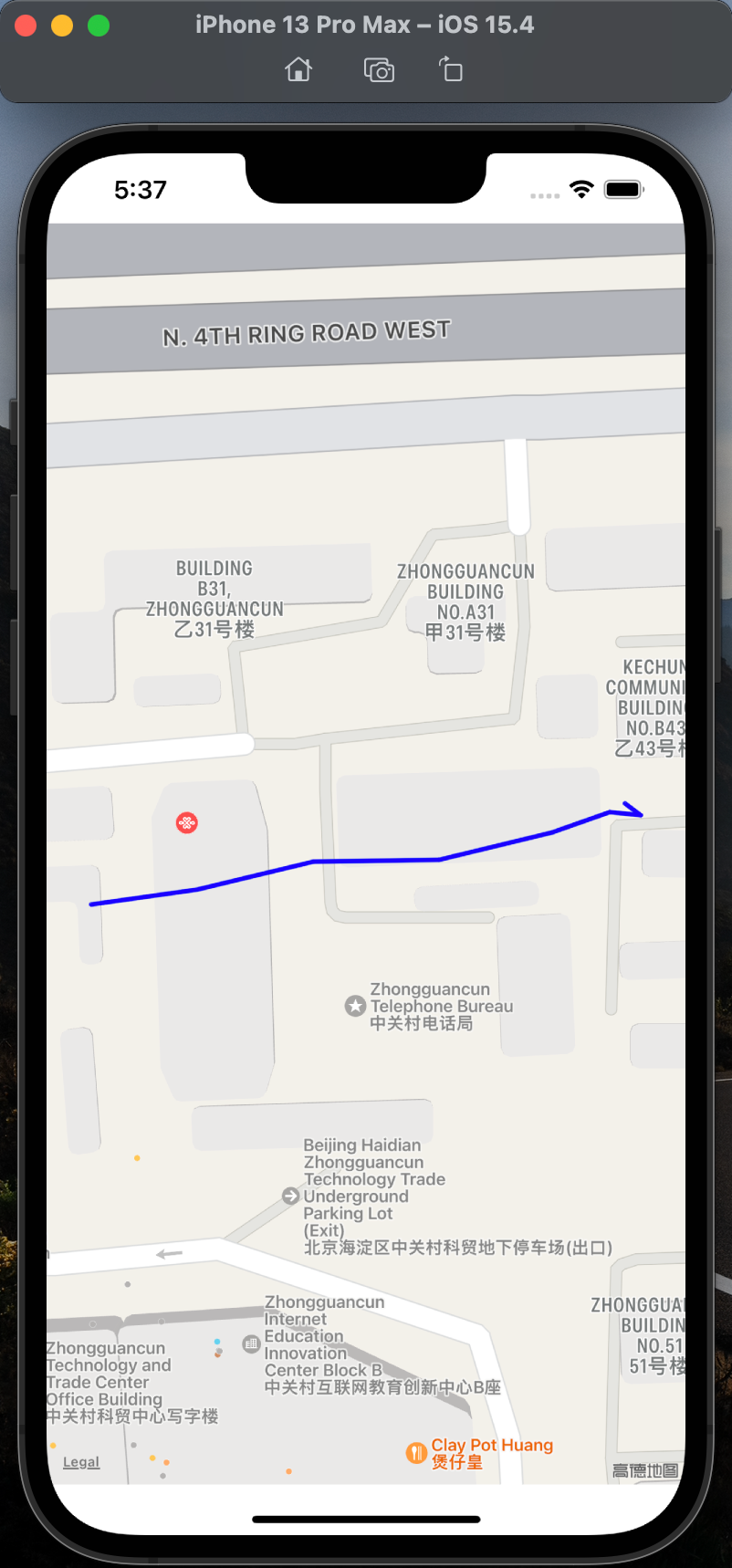
脑海中一直有个做地图类应用的想法,本科做移动轨迹相关的毕业设计。此类应用主要包括地图(Map)、坐标点(Location)、绘制轨迹(Polyline)几个要素。这篇博文将会使用 SwiftUI 在地图上连接坐标点绘制出轨迹。GPS 坐标数据可以在 microsoft 上下载。效果如下:
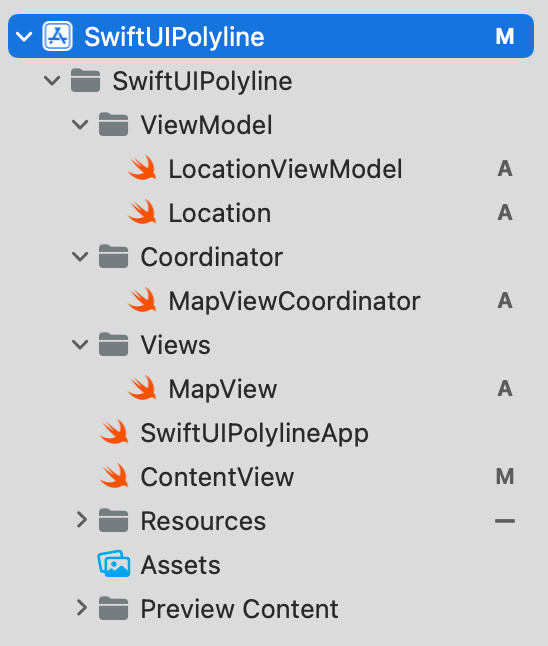
 首先创建一个 SwiftUI 工程的项目,项目的文件组织如下:
 先定义坐标点的数据结构,代码如下:
 1
 2
 3
 4
 5
 6
 7
 8
 9
10
|
import Foundation

struct Location: Hashable, Codable, Identifiable {
    var id: Int
    // 经度
    var longitude: Double
    // 纬度
    var latitude: Double
    var isValid: Bool
}
|
坐标数据的 ViewModel,我们将从 location.json 中加载所有的坐标点,代码如下:
 1
 2
 3
 4
 5
 6
 7
 8
 9
10
11
12
13
14
15
16
17
18
19
20
21
22
23
24
25
26
27
28
29
|
import Foundation

final class LocationViewModel: ObservableObject {

    @Published var locations: [Location] = load("location.json")

}

func load<T: Decodable>(_ fileName: String) -> T {
    // The data value type allows simple byte buffers to take on behavior of Foundation objects.
    let data: Data

    guard let file = Bundle.main.url(forResource: fileName, withExtension: nil) else {
        fatalError("Couldn't find \(fileName) in main bundle.")
    }

    do {
        data = try Data(contentsOf: file)
    } catch {
        fatalError("Couldn't load \(fileName) from main bundle:\n\(error)")
    }

    do {
        let decoder = JSONDecoder()
        return try decoder.decode(T.self, from: data)
    } catch {
        fatalError("Couldn't parse \(fileName) as \(T.self):\n\(error)")
    }
}
|
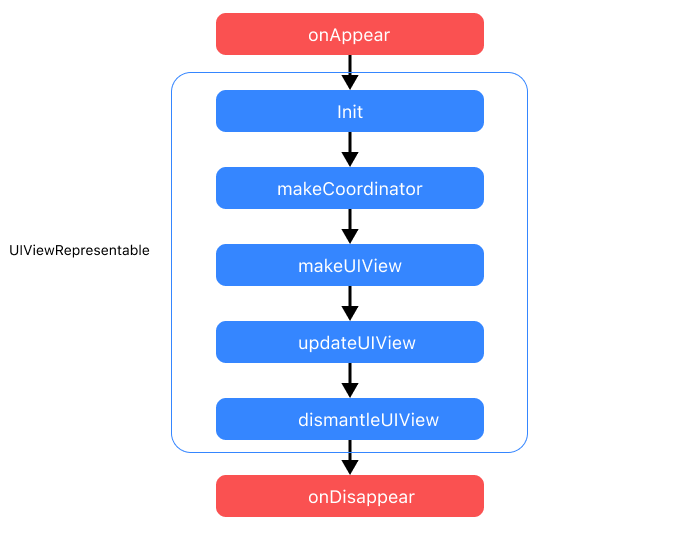
接下来我们将利用 UIViewRepresentable 这个协议实现将 UIKit 的 UIView 集成到 SwiftUI 中使用。UIViewRepresentable 只包含四个方法。其中 makeUIView , updateUIView 用于创建和更新视图。makeCoordinator 创建协调器,用于通知其它 UI 与该 View 之间的变化更新。dismantleUIView 用于在移除 View 时做一些善后操作。四个方法在 UIViewRepresentable 生命周期中的调用顺序如下:
 我们的 MapView 代码如下:
 1
 2
 3
 4
 5
 6
 7
 8
 9
10
11
12
13
14
15
16
17
18
19
20
21
22
23
24
25
26
27
28
29
30
31
32
33
34
35
36
37
38
39
40
41
42
43
44
45
46
47
48
|
import SwiftUI
import MapKit

struct MapView: UIViewRepresentable {

    private let locationViewModel = LocationViewModel()
    private let mapZoomEdgeInsets = UIEdgeInsets(top: 30.0, left: 30.0, bottom: 30.0, right: 30.0)


    func makeCoordinator() -> MapViewCoordinator {
        MapViewCoordinator(self)
    }

    func makeUIView(context: Context) -> MKMapView {
        let mapView = MKMapView()
        mapView.showsUserLocation = true
        mapView.delegate = context.coordinator
        return mapView
    }

    func updateUIView(_ uiView: MKMapView, context: UIViewRepresentableContext<MapView>) {
        updateOverlays(from: uiView)
    }

    private func updateOverlays(from mapView: MKMapView) {
        mapView.removeOverlays(mapView.overlays)

        var coordinates = [CLLocationCoordinate2D]()
        for i in 0..<locationViewModel.locations.count {
            let location = locationViewModel.locations[i]
            coordinates.append(CLLocationCoordinate2D(latitude: location.latitude, longitude: location.longitude))
        }

        let polyline = MKPolyline(coordinates: coordinates, count: locationViewModel.locations.count)
        mapView.addOverlay(polyline)
        setMapZoomArea(map: mapView, polyline: polyline, edgeInsets: mapZoomEdgeInsets, animated: true)
    }

    private func setMapZoomArea(map: MKMapView, polyline: MKPolyline, edgeInsets: UIEdgeInsets, animated: Bool = false) {
        map.setVisibleMapRect(polyline.boundingMapRect, edgePadding: edgeInsets, animated: animated)
    }
}

struct MapView_Previews: PreviewProvider {
    static var previews: some View {
        MapView()
    }
}
|
协调器 MayViewCoordinator 代码如下:
 1
 2
 3
 4
 5
 6
 7
 8
 9
10
11
12
13
14
15
16
17
18
19
20
21
22
23
24
25
26
27
28
|
import Foundation
import MapKit

final class MapViewCoordinator: NSObject, MKMapViewDelegate {

    private let mapView: MapView

    init(_ control: MapView) {
        self.mapView = control
    }

    func mapView(_ mapView: MKMapView, didAdd views: [MKAnnotationView]) {
        if let annotationView = views.first, let annotation = annotationView.annotation {
            if annotation is MKUserLocation {
                let region = MKCoordinateRegion(center: annotation.coordinate, latitudinalMeters: 1000, longitudinalMeters: 1000)
                mapView.setRegion(region, animated: true)
            }
        }
    }

    func mapView(_ mapView: MKMapView, rendererFor overlay: MKOverlay) -> MKOverlayRenderer {
        let renderer = MKPolylineRenderer(overlay: overlay)
        // set the line properties such as color and width
        renderer.strokeColor = .blue
        renderer.lineWidth = 3.0
        return renderer
    }
}
|
参考链接
https://www.fatbobman.com/posts/uikitInSwiftUI/
https://medium.com/@mauvazquez/decoding-a-polyline-and-drawing-it-with-swiftui-mapkit-611952bd0ecb